
When depositing cryptocurrency on a trading platform, users need to know whether the platform holds enough assets to cover their balances and whether those funds are properly accounted for. Proof of Reserves (PoR) provides greater transparency by allowing users to review published reserve data and verify that their recorded balances are included in the platform's accounting.
At BingX, we publish monthly Proof of Reserves snapshots and use Merkle tree technology to help users verify their assets while protecting their privacy. Learn how BingX 100% Proof of Reserves works, what reserve ratios mean, how to verify your crypto holdings step by step, and what these disclosures can and cannot tell you about the security of your funds.
What Is BingX 100% Proof of Reserves and How Does It Work?
Proof of Reserves (PoR) is a transparency mechanism that compares a platform's disclosed on-chain reserve assets with user balances, also known as liabilities, at a specific snapshot time. At BingX, 100% Proof of Reserves means that the reserve wallets included in the disclosure hold at least the amount of each supported asset recorded in user accounts.
For example, if users collectively hold 100 BTC at the snapshot, our disclosed reserve wallets must contain at least 100 BTC. We calculate reserve coverage using the following formula:
Reserve Ratio = Platform Reserves ÷ Users' Assets × 100%
A reserve ratio of 100% indicates that disclosed reserves match corresponding user balances, while a ratio above 100% indicates additional coverage. These figures represent a point-in-time snapshot, not the live balance when users open the page.
What Can Proof of Reserves Verify?
Proof of Reserves allows users to review three key aspects of our published reserve data:
- Reserve coverage: Check whether the reserve ratio for each supported asset is at least 100% at the selected snapshot.
- Recorded user balances: Review your holdings in My Assets and compare the Total with the result from the Merkle Tree Verifier.
- Reserve wallet addresses: Download published wallet addresses and check their on-chain balances using public blockchain explorers.
However, PoR reflects reserves at a specific snapshot and does not guarantee future solvency, immediate withdrawals, or coverage of assets and liabilities outside the disclosure. Third-party audit reports provide additional verification, but users should check each report's date and scope separately from monthly snapshots.
What Are the Latest BingX Proof of Reserves Ratios?
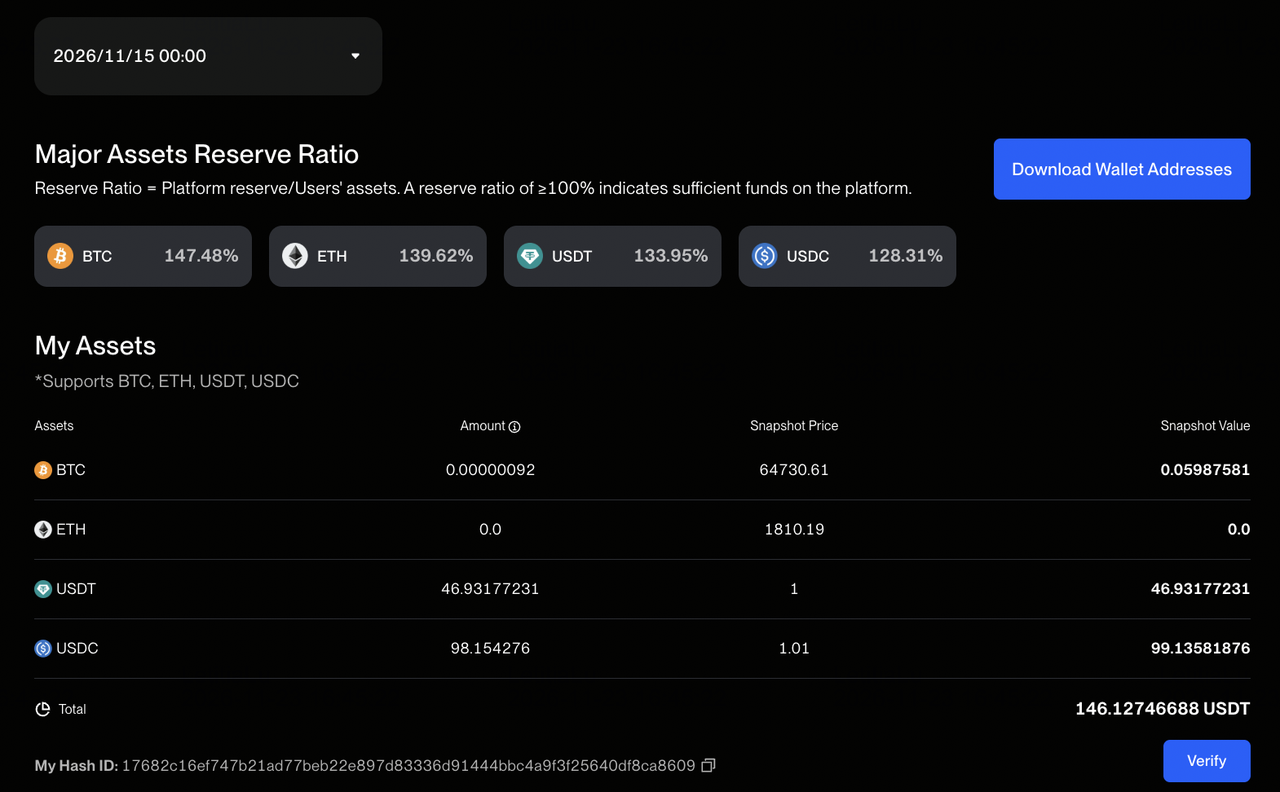
According to the November 15, 2026 snapshot, BingX reported reserve ratios above 100% for four major cryptocurrencies. For example, a BTC reserve ratio of 147.48% means that BingX held approximately 1.47 BTC in disclosed reserves for every 1 BTC held by users at the snapshot time.
|
Asset |
Reserve Ratio |
|
Bitcoin (BTC) |
147.48% |
|
Ethereum (ETH) |
139.62% |
|
Tether (USDT) |
133.95% |
|
USD Coin (USDC) |
128.31% |
These figures reflect reserve coverage for the four assets at the selected snapshot, not all assets held by BingX. Most company-owned assets are stored in separate wallets and excluded from the PoR calculation. Users can review the latest ratios and historical snapshots on the BingX Proof of Reserves page.
How Does a Merkle Tree Protect Your Privacy and Verify Your Assets?
A Merkle tree allows BingX to verify that user balances are included in a snapshot without revealing individual identities or holdings. It works like a collection of digital fingerprints, where account information is converted into unique codes called hashes. BingX uses SHA-256 hashing to organize these records and detect any changes.
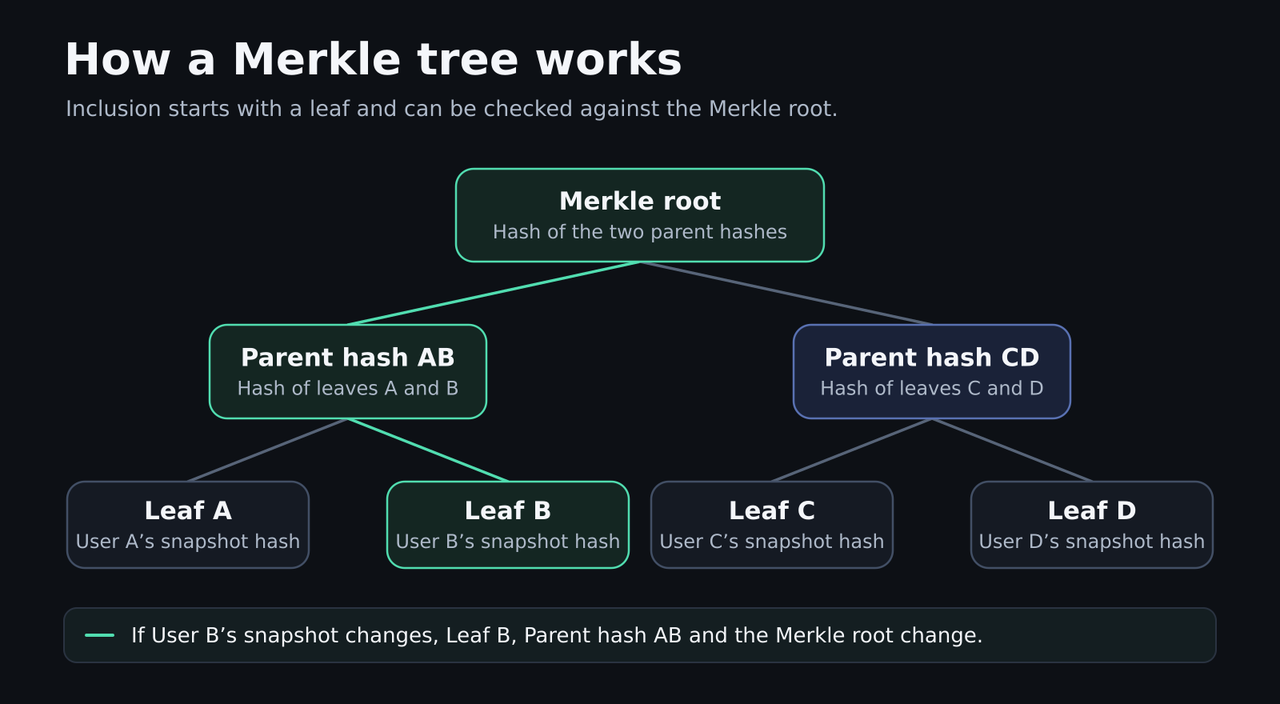
The process involves five key steps:
- Leaf nodes: Each user's account ID (UID) is hashed, combined with their recorded asset balances, and hashed again to create a unique leaf.
- Parent hashes: Two hashes are combined and hashed again to create a parent hash. This process repeats through the tree.
- Merkle root: The final hash at the top represents all user records in the snapshot.
- Change detection: If an account ID or balance changes, the connected hashes and Merkle root also change, making modifications detectable.
- Balance inclusion: Users can check whether their record is included using a Hash ID. A full cryptographic check can also recreate the Merkle root using the relevant leaf and proof path.
How to Verify Your Assets Using BingX Proof of Reserves: Step-by-Step Guide
You can verify your recorded assets through the BingX Merkle Tree Verifier without programming skills. Follow these steps to review reserve data, retrieve your Hash ID, and confirm your snapshot balance.
Part A: Review the Public Proof of Reserves Data
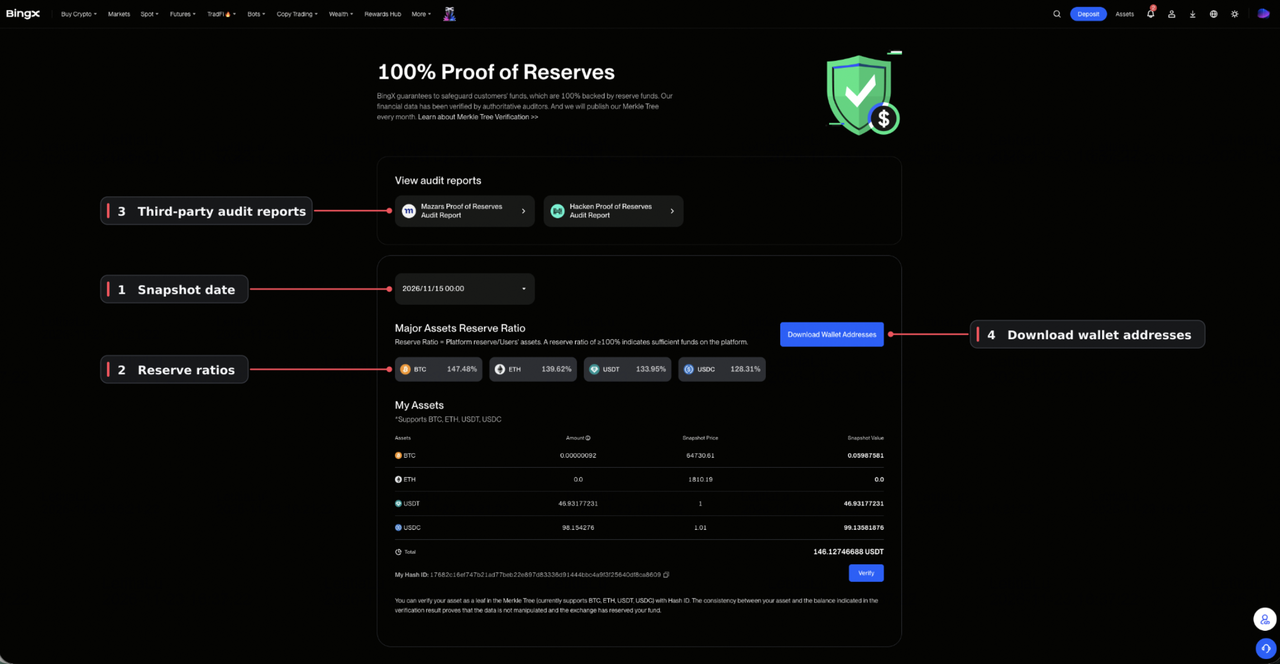
- Open the official PoR page: Visit the BingX Proof of Reserves page or access it through the BingX Trust Center. Look for "100% Proof of Reserves."
- Select a snapshot date: Use the date selector in the upper-left area of the reserve section to view the latest or an earlier snapshot.
- Check the reserve ratios: Under "Major Assets Reserve Ratio," review the figures. A ratio of 100% or higher means our disclosed reserves covered user balances for that asset at the selected snapshot.
- Review third-party audit reports: Under "View audit reports," open the Mazars or Hacken reports. Check the date and scope, as these may differ from the selected snapshot.
Part B: Log In and Find Your Hash ID
My Hash ID is a unique identifier linked to your recorded balances in a selected Proof of Reserves snapshot. It is generated from hashed account information, allowing you to verify your assets without publicly revealing your identity or individual holdings.
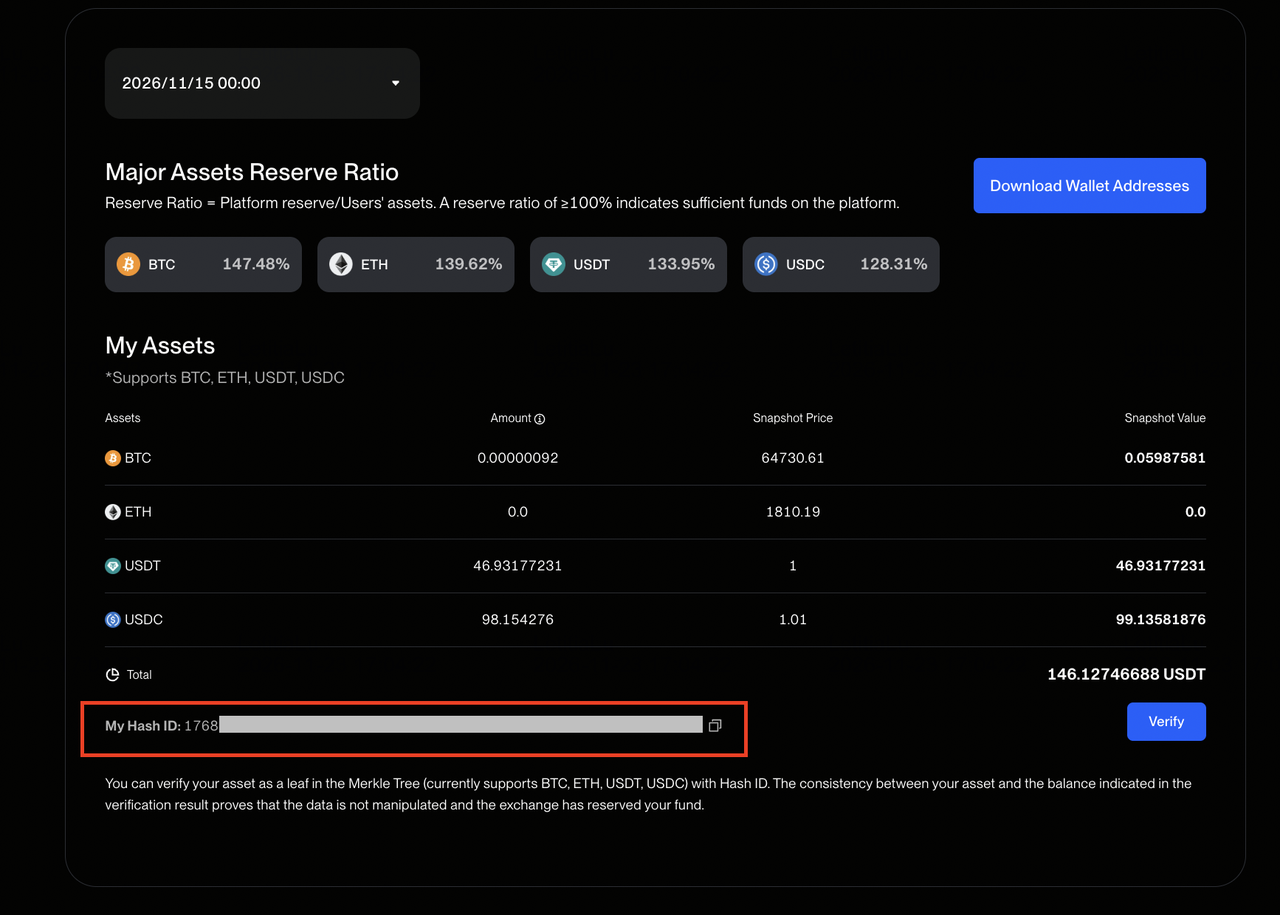
- Log in to BingX: Click "Log In," "Login to see more" under My Assets, or "Login to verify." Before logging in, My Hash ID may appear as "- -".
- Select your snapshot and review My Assets: Choose a date and review Assets, Amount, Snapshot Price, Snapshot Value, and Total in USDT. These represent your holdings at the snapshot time, including the Fund Account, Futures Account, and Copy Trading Account, but excluding unrealized PnL.
- Copy My Hash ID: Find "My Hash ID" below the table and click the copy icon. Avoid sharing it publicly, as others may be able to look up the associated Total.
- Open the Verifier: Click the blue "Verify" button beside My Hash ID to access the Merkle Tree Verifier.
Supported Assets: Our November 2026 reserve disclosure covers BTC, ETH, USDT, and USDC, while the current public My Assets and Merkle Tree verification interface explicitly lists BTC, ETH, and USDT. Check the supported assets displayed on the page before verification.
Part C: Verify Your Hash ID and Recorded Balance
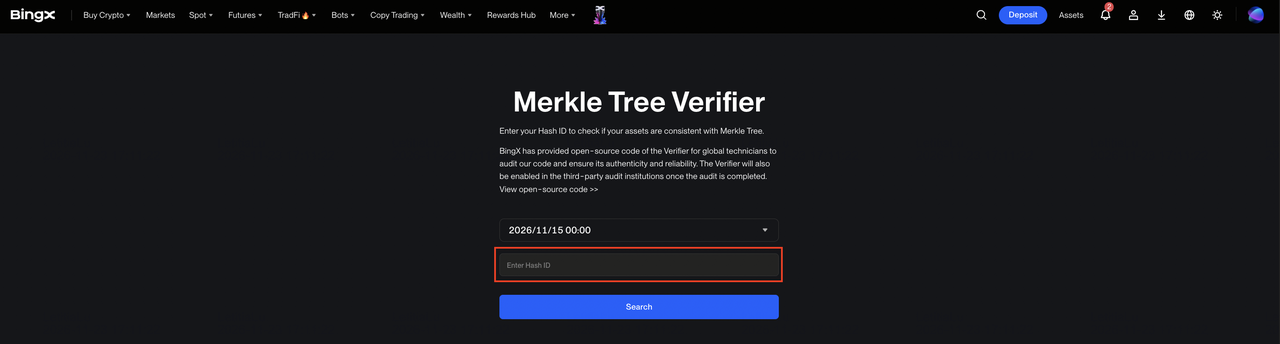
- Confirm the snapshot date: On the "Merkle Tree Verifier" page, make sure the date matches the one selected in My Assets.
- Enter your Hash ID: Paste the copied identifier into "Enter Hash ID" without extra spaces, then click the blue "Search" button.
- Compare your balances: Check whether "Total Assets" in the Verifier matches the "Total" shown in My Assets for the same snapshot.
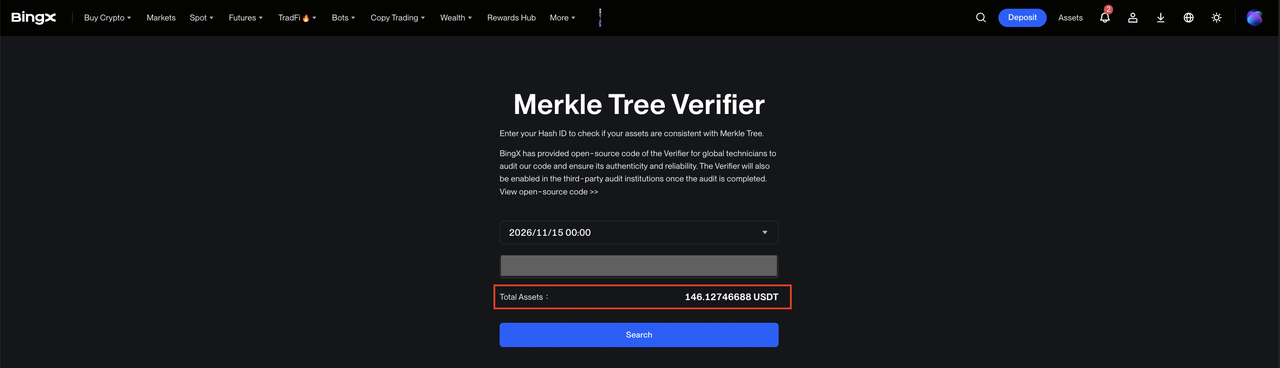
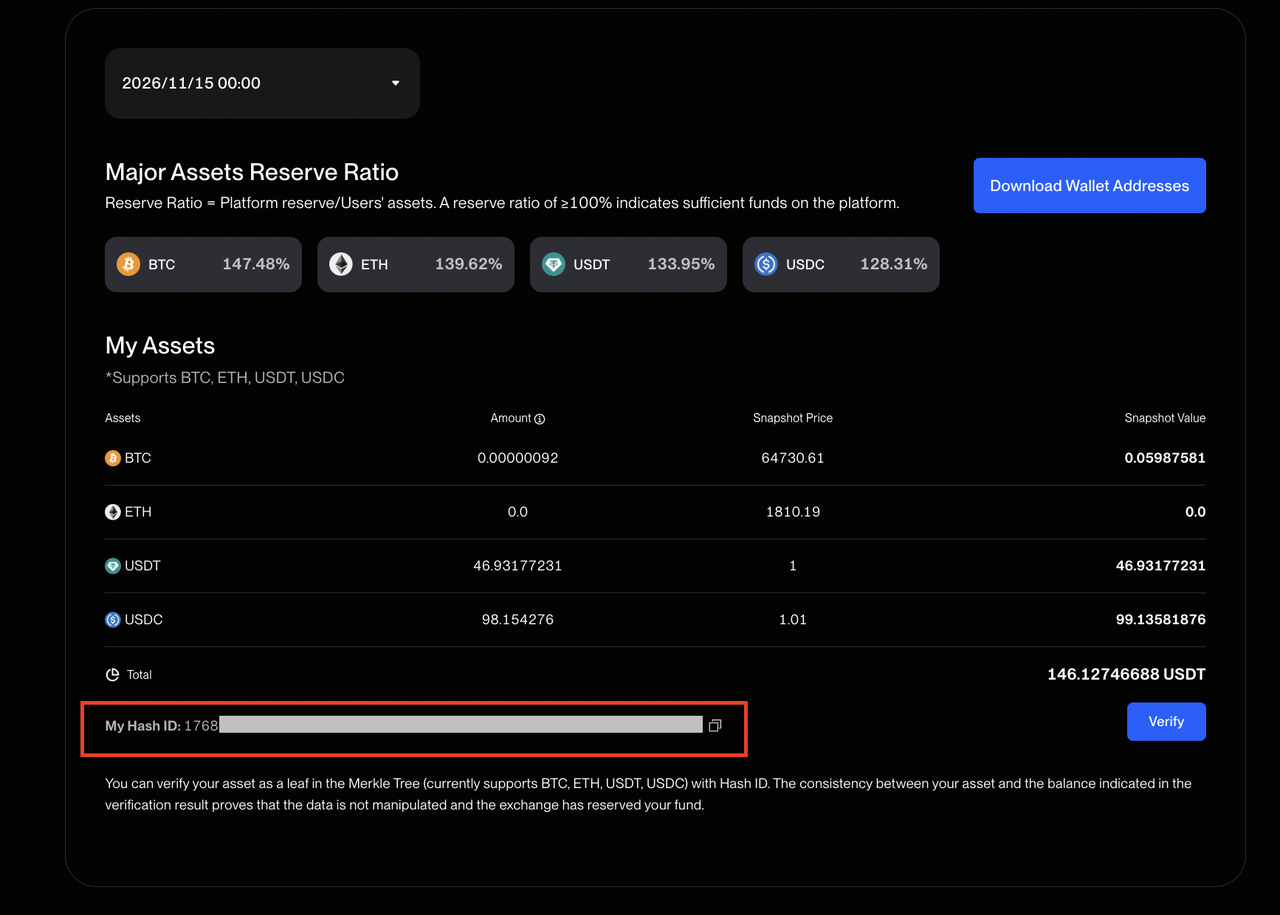
For example, if both pages show 146.12746688 USDT, the comparison passes, confirming that the two snapshot records are consistent. Verification of reserve assets requires the additional wallet and audit checks described below.
If the figures do not match: Confirm the snapshot date, copy your complete Hash ID, and search again. If the difference remains, contact BingX Support with the snapshot date and both totals. Do not change or round the figures to force a match.
If My Hash ID is unavailable: Make sure you are logged in and have selected a snapshot when your account held supported assets. If your account was created later or had no eligible holdings, try another snapshot or contact BingX Support.
How to Verify BingX Reserve Wallet Addresses on the Blockchain
The Merkle Tree Verifier checks recorded user balances, while blockchain explorers allow users to inspect our published reserve wallet addresses. This provides another way to review the assets included in our PoR disclosure.
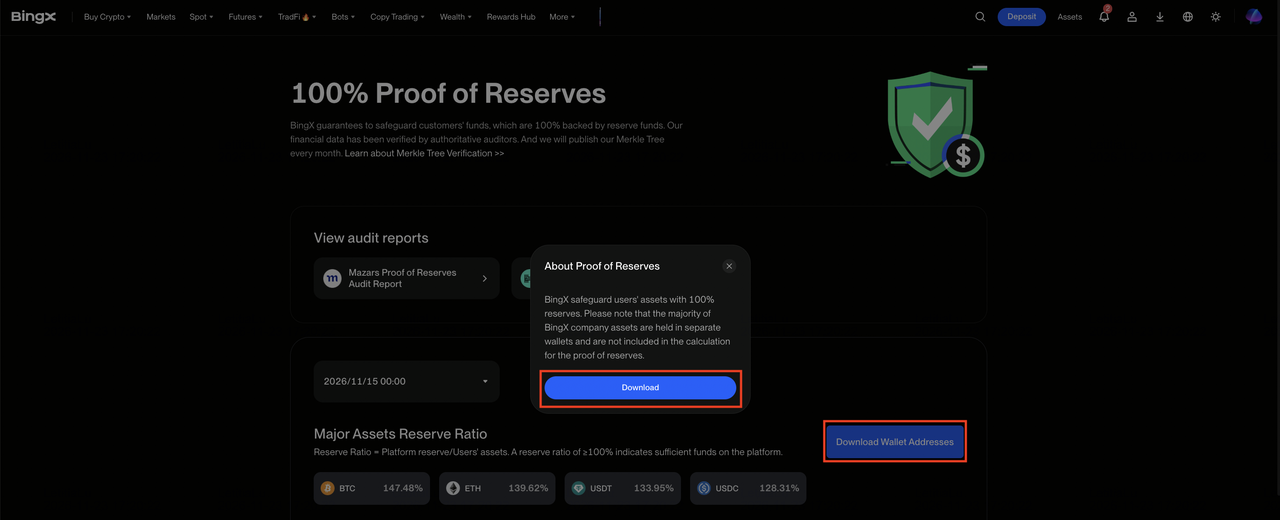
- Download the wallet addresses: Visit the BingX PoR page and click "Download Wallet Addresses." Review the "About Proof of Reserves" notice, then click "Download" to obtain the Excel file.
- Review the wallet information: Open the file to find reserve wallets listed by coin, network, and address. Check the network before selecting a blockchain explorer.
- Inspect the addresses on-chain: Copy a wallet address and search for it using a compatible explorer, such as mempool.space for Bitcoin or Etherscan for Ethereum.
- Understand the results: Blockchain explorers display current wallet balances, which may differ from the snapshot as assets move over time. Viewing a balance alone does not confirm wallet ownership.
During third-party audits, wallet ownership may be verified through signed messages or small test transactions. Review the published addresses alongside the reserve ratios and audit reports to better understand our reserve coverage.
How Do BingX 100% Proof of Reserves and the $150M Shield Fund Protect Assets?
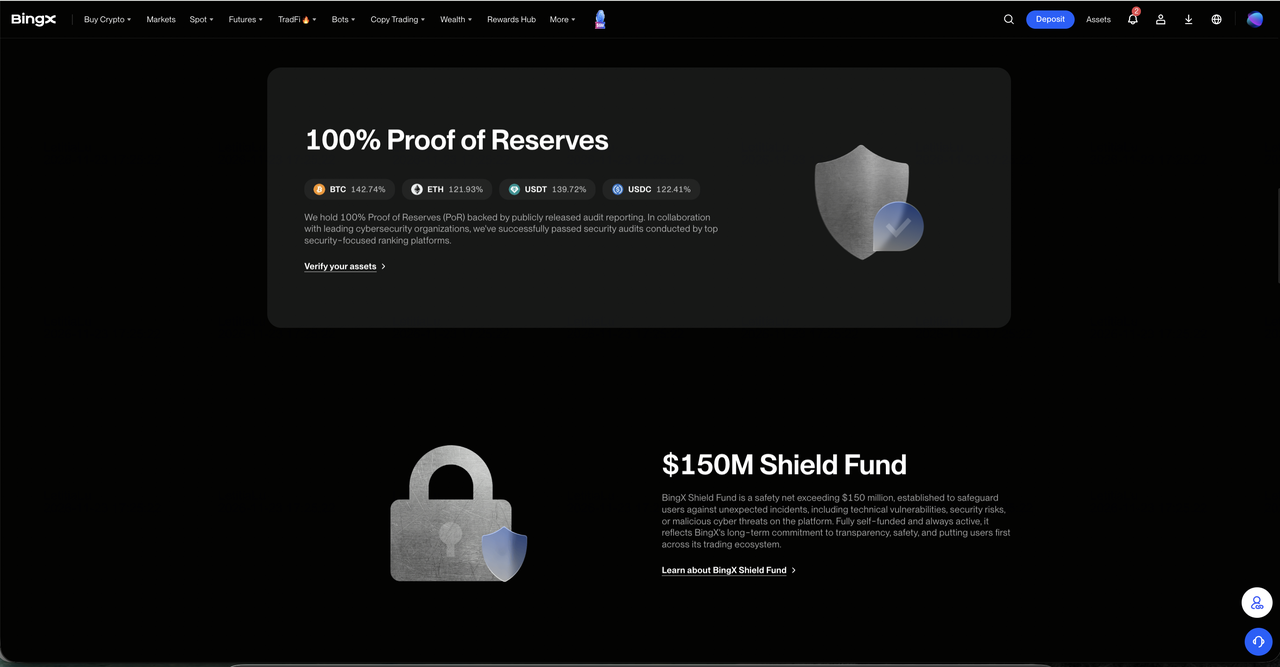
BingX Proof of Reserves and the Shield Fund are two complementary security measures with different purposes. PoR provides transparency into our disclosed reserve backing, while the Shield Fund offers an additional safety net against unexpected incidents.
- 100% Proof of Reserves (PoR): Provides monthly reserve snapshots, coverage ratios, Merkle tree verification, and published wallet addresses to help users review recorded balances and reserve assets.
- $150M Shield Fund: A safety net exceeding $150 million, established to help protect users against eligible incidents involving technical vulnerabilities, security risks, or malicious cyber threats.
Together, these measures support asset transparency and provide an additional layer of protection. However, neither guarantees complete protection against financial losses or replaces regular account security checks.
Final Thoughts: Verify Your BingX Assets With Proof of Reserves
In the digital asset industry, trust requires verifiable proof. BingX 100% Proof of Reserves allows users to review published reserve ratios, verify recorded balances through the Merkle Tree Verifier, and inspect reserve wallet addresses on the blockchain.
Visit the BingX Proof of Reserves page to check the latest snapshot, verify your Hash ID, and review third-party audit reports. These tools provide greater transparency into how user assets are accounted for and the scope of our disclosed reserves.
Risk Reminder: Proof of Reserves provides snapshot-based transparency but does not guarantee future solvency, immediate withdrawals, or complete protection against financial losses. Crypto trading involves volatility and potential loss of principal. This article is for security education only, not investment advice. Always use official BingX channels and contact BingX Support for account-related concerns.
FAQs About BingX Proof of Reserves
1. Why Is My Snapshot Balance Different From My Current Balance?
A snapshot records your holdings at a specific time. Later transactions may change your balance, and unrealized PnL is excluded. Compare My Assets with your holdings at the selected snapshot time.
2. Why Can't I Find My Hash ID?
Make sure you are logged in and have selected a snapshot when your account held supported assets. If My Hash ID is unavailable, try another snapshot or contact BingX Support.
3. Is My Privacy Protected During Merkle Tree Verification?
We use hashed UIDs to protect account identities. Your Hash ID does not directly reveal your identity or holdings, but others may use it to look up your snapshot Total. Avoid sharing it publicly.
4. Does a Reserve Ratio Above 100% Guarantee Immediate Withdrawals?
No. It means our disclosed reserves exceeded user balances at the selected snapshot, but does not guarantee future coverage, immediate withdrawals, or overall solvency.
5. Are All Cryptocurrencies Included in BingX Proof of Reserves?
No. The November 15, 2026 snapshot covered BTC, ETH, USDT, and USDC, while the public My Assets and Merkle Tree verification interface explicitly lists BTC, ETH, and USDT.
6. Can I Verify the Merkle Root Myself With Code?
Yes. Our open-source verification tool supports cryptographic inclusion checks using a Merkle proof path and trusted root. The on-page Verifier provides a simpler balance comparison.
